
Structured Cabling 101: What It Is, Why It Matters & How to Plan Your Enterprise Network
Author
SSAL Expert TeamPublished
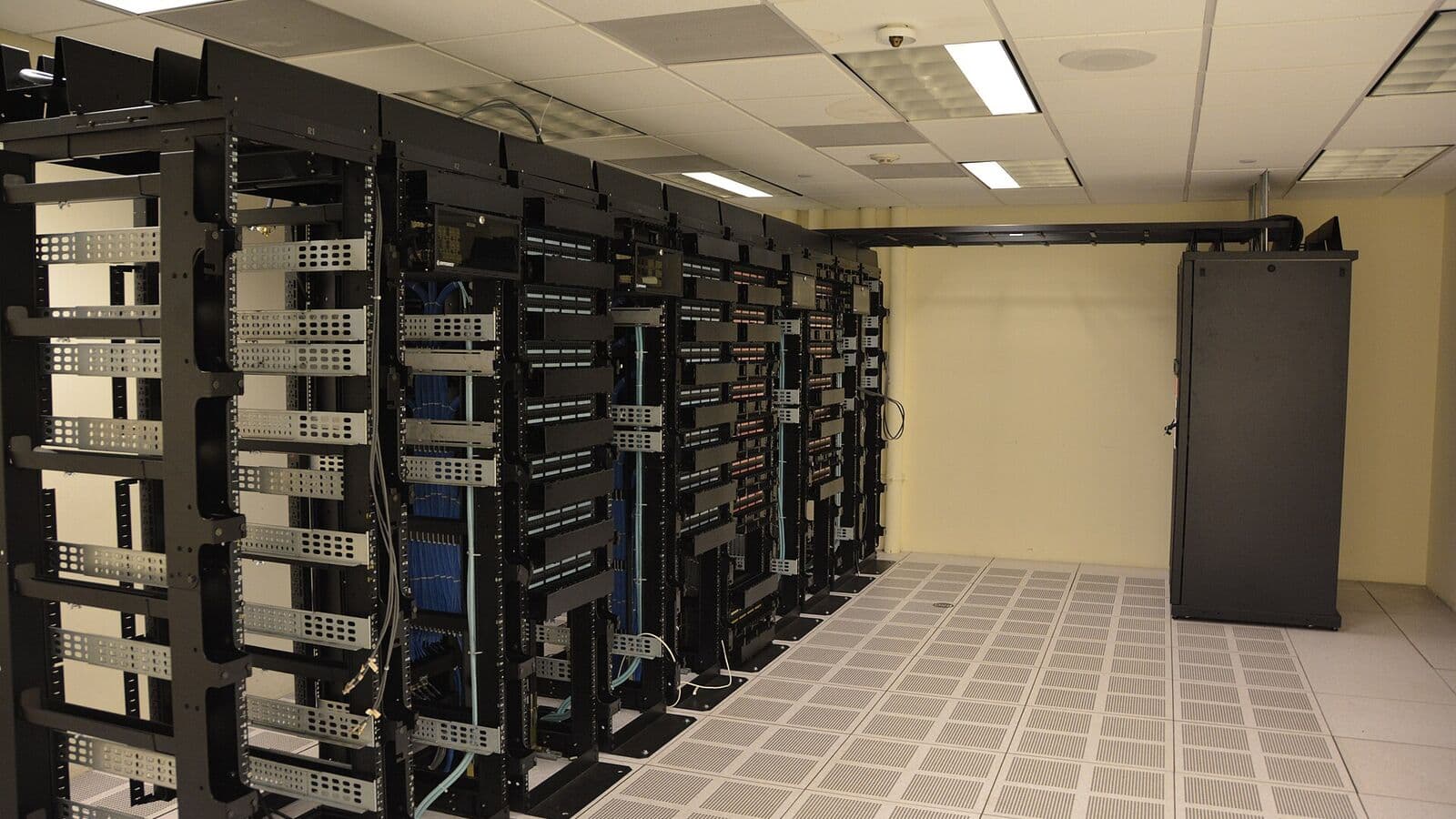
When most people think about a corporate network, they think about Wi-Fi signals and cloud applications. But underneath every wireless connection, every video conference call, every access control card reader, and every IP security camera is a physical layer of copper and fibre cables — the structured cabling system — that determines how reliably and how fast everything works.
If your structured cabling is well-designed and properly installed, it is invisible: everything just works. If it is poorly done — a tangle of unlabelled cables, mismatched components, and runs that exceed distance limits — it is the source of endless, expensive network problems that software cannot fix.
This guide explains what structured cabling is, why it matters for Bangladesh enterprises, and how to plan a system that serves your organisation reliably for decades.
What Is Structured Cabling?
Structured cabling is a standardised approach to designing and installing the physical telecommunications infrastructure of a building or campus. The "structured" part means the system follows a defined architecture — with specific subsystems, performance standards, and documentation requirements — rather than the ad hoc "point-to-point" wiring approach it replaced.
The Problem with Point-to-Point Wiring
In the era before structured cabling, buildings were wired by connecting each device directly to the equipment it communicated with. A telephone connected to the telephone exchange with a dedicated pair. A terminal connected to the mainframe with its own proprietary cable. Each new system installed new cables, often without labelling or documentation.
Over time, the result was "cable spaghetti" — walls full of cables serving unknown purposes, ceiling voids packed with unmarked bundles, and wiring closets that technicians approached with dread. Troubleshooting required tracing cables by hand. Moving an employee's workstation meant running a new cable. Upgrading equipment meant laying more cables over the old ones.
Structured Cabling Solves These Problems
Structured cabling defines a universal, multi-application infrastructure — a single physical platform that supports data networking, voice telephony, security systems, building automation, and other services simultaneously. Any device connects to any outlet through the structured cabling infrastructure. Moves, additions, and changes are accomplished by re-patching at the wiring closet, not by pulling new cables. Documentation is standardised, making troubleshooting fast and systematic.
A well-installed structured cabling system has a physical service life of 20–25 years. Over that life, it will support multiple generations of networking equipment — from 1GbE to 10GbE to 25GbE and beyond — without the cable infrastructure itself needing replacement.
The TIA-568 Standard: The Rules the Industry Follows
TIA-568 — published by the Telecommunications Industry Association — is the primary standard governing structured cabling in commercial buildings. It defines the physical and electrical performance requirements for cables, connectors, patch cords, and installation methods. The current version, TIA-568.2-D for balanced twisted-pair (copper) cabling and TIA-568.3-D for optical fibre cabling, sets the benchmark that all reputable structured cabling installers follow.
TIA-568 is referenced globally and is the standard that certified structured cabling manufacturers use as the test basis for their channel warranties. ISO/IEC 11801 is the international equivalent standard — the two align closely, and compliance with one generally implies compliance with the other.
In Bangladesh, TIA-568 is the de facto standard for commercial enterprise cabling projects. The Bangladesh National Building Code 2020 (BNBC 2020) references international telecommunications standards for building infrastructure, and TIA-568 is the recognised benchmark.
Category Performance Tiers
TIA-568 defines cable categories based on their frequency bandwidth and associated data rate support:
- Category 5e (Cat5e): 100 MHz, supports 1 Gigabit Ethernet (GbE) at up to 100 metres. The legacy standard, still widely installed but no longer recommended for new work.
- Category 6 (Cat6): 250 MHz, supports 1 GbE at 100m and 10 GbE at 55m (in low alien crosstalk environments). The minimum specification for new installations today.
- Category 6A (Cat6A): 500 MHz, supports 10 GbE at 100m reliably. Recommended for all new enterprise installations.
- Category 8 (Cat8): 2,000 MHz, supports 25/40 GbE at up to 30m. For data centre top-of-rack to server connections only.
The Building Blocks of a Structured Cabling System
TIA-568 organises structured cabling into defined subsystems. Understanding these subsystems is essential for planning your installation.
Work Area Subsystem
The work area is the physical space where users work — desks, offices, meeting rooms, reception areas. Each work area is served by telecommunications outlets — the familiar RJ-45 wall plates where you plug in your computer, IP phone, or wireless access point. TIA-568 recommends a minimum of 2 outlets per work area position, allowing for both a data connection and an IP telephone connection without using an unmanaged switch.
Work area outlets connect to horizontal cabling via patch cords — short, flexible cables that run from the outlet to the user's device. Patch cord quality matters: low-quality patch cords are the most common cause of link failures in otherwise well-installed systems.
Horizontal Cabling Subsystem
Horizontal cabling runs from each work area outlet back to the floor's wiring closet — the Intermediate Distribution Frame (IDF), also called a floor distributor (FD) in ISO 11801 terminology. This is the most cable-intensive subsystem: a 15,000 m² floor plate with 200 work area outlets requires 200 horizontal cable runs, each up to 90 metres in length (plus 10 metres for patch cords at each end, to reach the TIA-568 maximum channel length of 100 metres).
Horizontal cables are permanently installed — they run through conduit, cable trays, or plenum spaces in the building structure. They are intended to remain in place for the life of the building. Specifying horizontal cable one category higher than your current active equipment requires is always worth the incremental cost: the labour to replace horizontal cabling far exceeds the cable cost differential.
Backbone Cabling Subsystem
Backbone cabling interconnects the floor-level IDFs to the building's Main Distribution Frame (MDF), and interconnects MDFs on a multi-building campus. Backbone runs typically use optical fibre (for high bandwidth and long-distance capability) but may also include high-pair-count copper cables for voice backbone in buildings with traditional PABX systems.
For a 10-floor office building in Dhaka, the backbone runs vertically through a dedicated telecommunications shaft (riser), with one or more IDFs per floor and a single MDF at ground floor or basement level. Each IDF connects to the MDF via fibre backbone, typically 12- or 24-strand multimode (OM3 or OM4) or single-mode fibre.
MDF: Main Distribution Frame
The MDF (Main Distribution Frame) is the heart of the building's network infrastructure. It houses the core network switch, firewall, Internet and WAN connectivity, and the servers of any on-premise applications. All backbone cables terminate in the MDF. Internet connectivity — typically fibre from ISP providers like BTCL, Grameenphone Enterprise, or Robi — terminates here.
The MDF room must be properly sized, cooled, grounded, and powered. TIA-942 specifies requirements for data centre and telecommunications room design that apply to MDF design: adequate floor space for current equipment plus future growth, dedicated cooling, uninterruptible power supply (UPS), and a raised floor or overhead cable management system.
IDF: Intermediate Distribution Frame
IDFs serve individual floors or building sections. Each IDF houses the floor-level network switches, patch panels for horizontal cable terminations, and the horizontal-to-backbone interconnection. IDFs are typically located in telecommunications rooms (TRs) — dedicated spaces of 10–14 m² per floor, positioned to minimise horizontal cable run lengths.
In Bangladesh commercial buildings, telecommunications rooms are sometimes treated as afterthoughts in architectural planning — too small, poorly ventilated, or used as storage. This is a false economy: undersized or poorly designed TRs create operational problems that persist for the building's life and cost far more to remediate than they would have to prevent.
Planning Your Enterprise Structured Cabling System
A structured cabling project begins with a planning phase that determines the system's scope, performance level, and physical routing. Here are the key planning decisions you need to make.
Determine the Number of Outlets
Start by mapping your work areas. Count every desk position, every meeting room, every reception point, every security camera location, every wireless access point mounting position, and every other device connection point. For each, determine how many outlets are needed: TIA-568 recommends a minimum of 2 per work area, but access control readers, security cameras, and WAPs each typically need only 1.
For a 15,000 m² office building with 500 desk positions, 20 meeting rooms, 100 IP cameras, 60 wireless access points, and 50 miscellaneous connections, the total outlet count is approximately 1,300. This number drives cable quantities, patch panel counts, and port counts on network switches.
Determine Horizontal Cable Routing
Map the cable pathway from each work area to its serving IDF. Cables run through conduit embedded in slabs and walls, through J-hooks in ceiling voids, or through raised floor systems. In Bangladesh commercial buildings, ceiling-void routing via cable tray and J-hooks is most common. Confirm that your building's ceiling void depth, structural beam positions, and air conditioning ductwork allow the required cable routing.
Ensure no horizontal cable run exceeds 90 metres (TIA-568's maximum for the permanent link, excluding patch cords). In a deep floor plate building, the IDF position is critical: if the IDF is at one end of a 50-metre-deep floor, some work areas at the far end may approach or exceed the 90-metre limit. Position IDFs centrally on each floor where possible.
Define the Backbone Architecture
Determine the MDF and IDF locations and the backbone cable routes between them. In a multi-floor building, the backbone runs vertically through a dedicated riser (a vertical shaft reserved for telecommunications cabling, separate from electrical and mechanical risers). For a multi-building campus in Bangladesh — a university, hospital complex, or industrial park — the backbone runs between buildings via underground conduit or aerial cable pathways.
Specify backbone cable type: multimode fibre (OM3 or OM4) for runs up to 300 metres at 10 GbE, single-mode fibre (OS2) for longer runs or future-proofing. Determine the number of fibres: 12-strand is typical for building backbone, but 24-strand provides growth capacity and redundancy at modest additional cost.
Equipment Room Design
The MDF must accommodate current and future network equipment. Plan rack space based on current core switches, firewall appliances, servers, and UPS, plus at least 30% spare capacity for future growth. Calculate heat load from all installed equipment and specify precision cooling accordingly. Ensure clean agent fire suppression (not water sprinklers, which destroy electronics). Plan power distribution with dedicated circuits, UPS, and clearly labelled breakers.
Why Structured Cabling Adds Resale Value and Reduces Future Costs
A certified structured cabling installation comes with a manufacturer's channel warranty — typically 15–25 years depending on the brand and installation certification level. Brands such as Commscope, Molex, Vericom, and Vivanco (SSAL's portfolio partners) offer extended channel warranties when their complete certified systems are installed by trained and certified contractors.
This warranty is a tangible asset. When a building is sold, leased, or refinanced, a certified structured cabling system with a remaining warranty is a documented infrastructure asset. A tangle of unbranded, unlabelled cables is a documented liability that will require complete replacement.
The productivity costs of network downtime in Bangladesh's commercial sector are also significant. A poorly installed cabling system that generates intermittent faults — connectivity drops, link speed negotiation failures, PoE power delivery problems — costs far more in lost productivity and IT troubleshooting time than the incremental cost of a higher-quality initial installation.
SSAL's Structured Cabling Expertise
SSAL is a certified installer for multiple leading cabling brands including Commscope, Molex, Vericom, and Vivanco. Our project team includes TIA-568-trained installation technicians and project managers with experience across Bangladesh's commercial, healthcare, government, and industrial sectors.
We deliver end-to-end structured cabling projects: from design and cable schedule development through physical installation, testing with certified FLUKE DSX cable analyzers, and as-built documentation. Every permanent link we install is tested and certified, providing the evidence base for manufacturer's channel warranty registration.
Get Free Consultation — Contact SSAL to discuss your structured cabling requirements. Whether you are planning a new building fit-out, expanding an existing network, or assessing an existing cabling plant, our team can help you plan a system that meets your needs today and is ready for tomorrow.
Filed under
- structured cabling
- TIA-568
- enterprise network
- MDF
- IDF
- Cat6A
- Bangladesh
- network infrastructure
SSAL Expert Team
SSAL engineering team — Bangladesh-focused technical writing on security, fire-safety, ICT, and building technology.
Related Articles
The Business Case for Upgrading from Cat5e to Cat6A: ROI Analysis for Bangladesh Enterprises
Business case for upgrading Cat5e to Cat6A cabling: bottleneck triggers, ROI analysis, 4K CCTV PoE requirements & upgrade strategies for Bangladesh enterprises.
OpenCat6 vs. Cat6A vs. Cat7 vs. Cat8: Which Ethernet Cable Should You Choose in 2026?
Compare Cat6, Cat6A, Cat7, and Cat8 Ethernet cables on speed, bandwidth, PoE support & cost. Learn which cable is best for Bangladesh enterprise installs in 2026.
OpenFiber Optic vs. Copper Cabling: When to Use Each in Enterprise & Data Centre Networks
When to use fiber optic vs copper cabling in enterprise networks. Compare cost, bandwidth, PoE, distance & EMI for Bangladesh offices, campuses & data centres.
OpenNeed Help Choosing the Right Solution?
SSAL engineers respond to RFQ submissions within 1 business day with a scoping call request.
- 48-hour site survey
- Free consultation
- 24/7 priority support